Cases
A case is the saved record of one session: one link, opened by one analyst, with its video, report and enrichment. A case can also hold one file, with its report. See Files.
Start a case
Paste a suspicious link and choose Preview. The preview shows what is in the link before livewells opens anything.
The preview shows:
- the unwrapped link, which is the final address after redirect wrappers such as safelinks;
- the cleaned link, where the recipient's email addresses become placeholders;
- the email addresses and tracking tokens found in the link;
- warnings, if any.
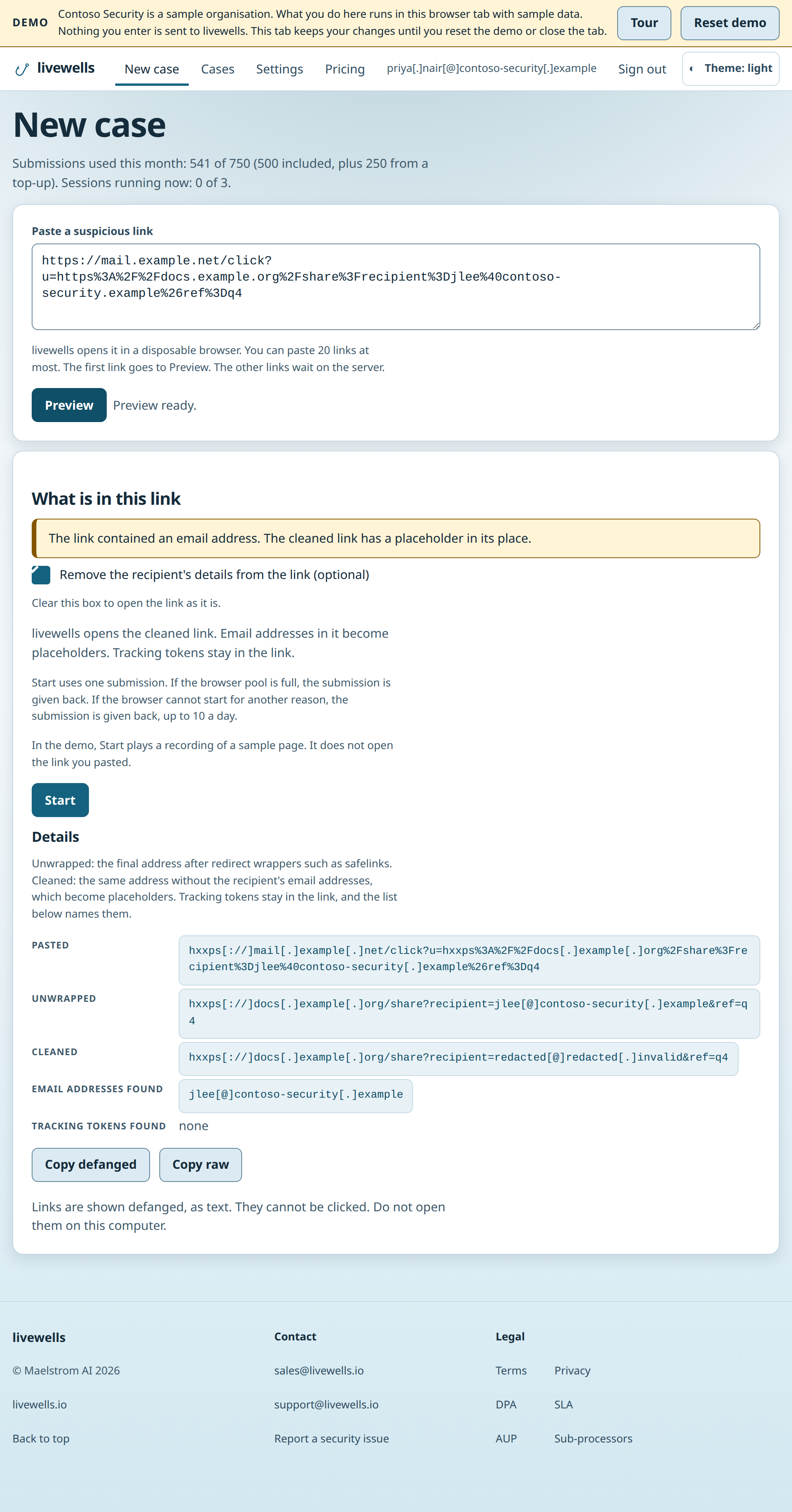
Choose Start to open the link. Tick or clear the box "Remove the recipient's details from the link (optional)" to choose between the cleaned link and the unwrapped link. Start uses one submission.
What you can paste
livewells finds the link in the text you paste, so ticket and chat text works.
- A defanged link, such as hxxps[://]evil[.]example/a, opens as a normal link.
- A name or an IP address with no scheme opens with https://.
- When the paste holds more than one link, livewells opens the first and says how many it found.
- livewells opens public web addresses.
- A link with spaces shows a message that asks you to remove them or to use %20.
- A link longer than 2048 characters shows a message that names the limit.
Warnings
A warning tells you when the written link and the real destination differ. Examples:
- The text before an @ sign is a login name, not the domain.
- The link writes its address as a number in an unusual form, not as a domain name.
- The domain uses letters from another alphabet that look like English letters.
- The domain uses a dot that is not the usual full stop.
- Part of the domain or path is written in an encoded form.
- The link contains characters that cannot be seen, or characters that change the reading direction.
- The link had tabs or line breaks inside it, or uses backslashes.
Your analysts set the verdict.
Sample downloads
A case that holds a stored file offers Download sample for each file. It offers Download all samples when it holds two or more. Each download is a password-protected ZIP with AES-256 encryption. The ZIP password is infected, and the page shows it. The file inside the ZIP is named by its SHA-256.
Before each download, the page asks you to confirm: "This file can be malicious. Open it only in an isolated analysis environment."
- One ZIP holds up to 20 files and 100 MiB. A larger set downloads one file at a time.
- Your organisation can download 10 ZIPs a minute. One person can download 60 ZIPs in a clock hour.
- An administrator can switch sample downloads off in Settings. The setting is on by default.
- The Export case ZIP holds the video and the reports. It holds no sample.
- Your organisation can export 10 case ZIPs a minute and make 120 video reads a minute.
The live view
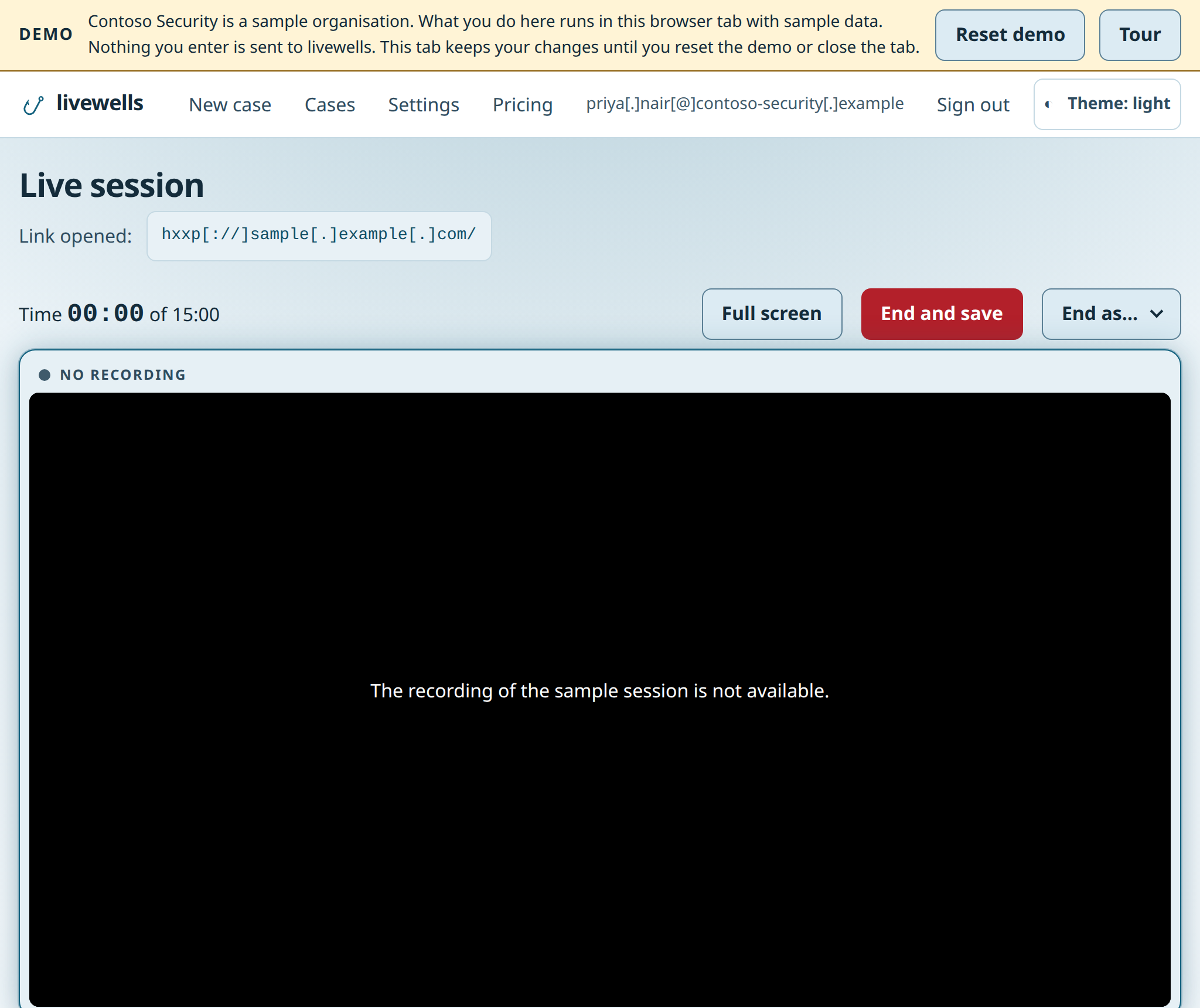
The live view shows the disposable browser in a window on the page. You use your own keyboard and mouse. Only the analyst who started a session can open its live view or end it. Other analysts in your organisation can read the finished case. The live view waits up to 45 seconds for a browser that is still starting.
End a case
Choose End and save to end the session. Choose End as… to end the session and set the verdict in one step.
The session also ends by itself:
- after 5 minutes without keyboard, mouse or clipboard input;
- when it reaches its time limit, which is 15 minutes in total at most;
- when the page makes 100 page changes, or sends the browser to 60 different sites. livewells checks every 10 seconds, so the session ends a few seconds after the limit. The case keeps the video and the report from before the end, and the network log when livewells kept it. The case says why the session ended;
- when the page changes its own address 300 times without loading a new page. The case says why the session ended;
- within about 10 seconds after your sign-in is revoked or your organisation is suspended.
If livewells cannot start the browser, it gives the submission back to your monthly count, up to 10 a day. A start that fails because the browser pool is busy is always given back. It does not count toward the 10 a day, and it does not count toward your starts in 15 minutes.
Read the report
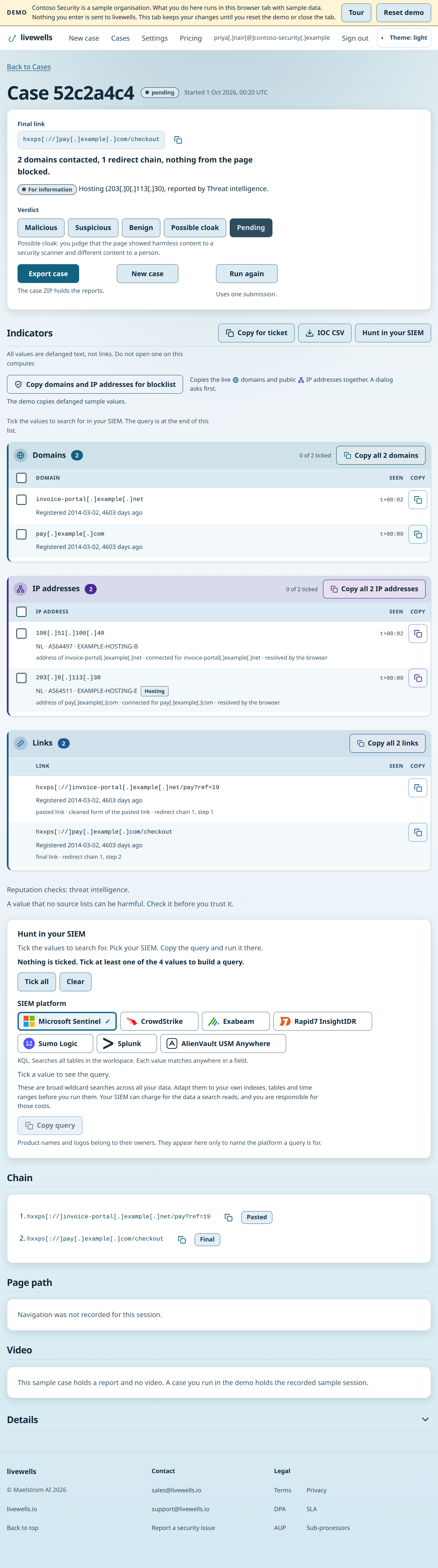
The case page shows the final link, the pasted link, an outcome line, the signals from enrichment and the verdict. Below them it lists the indicators: links, domains and IP addresses, and the chain of redirects. The case also plays the video.
The Page path section lists the first 200 page changes of the browser, as recorded by the browser, in order, with the time and how each one happened: the pasted link, a server redirect, the page, the address bar or back button, or a new tab. A reload of the same address is a page change. A change of the address inside one page, and a change after the #, are not page changes. The session ends after 300 of these changes, and the case says why. These changes do not flag the case. The section also gives the number of page changes and sites. When the browser makes 30 page changes, or reaches 25 different sites, the case is flagged: excessive redirects. The section also gives the number of sites that iframes load, taken from the network log. That figure does not count toward the flag. The browser keeps at most 10 open tabs. livewells closes the extra tabs, and the case counts them.
The Details section of the case names the connection that the session used and the country of its exit. The disposable browser reaches the web through an Australian exit address from our network provider. livewells looks up the country of each exit address and reuses the answer for 24 hours. It stops using an address that the lookup places outside Australia. The section also gives the exit address at its last check before the start, with its country and type from the provider lookup. When a session reaches its network limit, or a download reaches its size limit, the case says so at the top.
The verdict has four values: malicious, suspicious, benign and possible cloak. The analyst who ran the case, or an administrator, can set it on an ended case. Each verdict is written to the audit log.
Export a case
Choose Export case on the case page. You get one ZIP file when the session has ended. Any member of your organisation can export a case. Each export is written to the audit log.
The ZIP holds the recording when one was saved, the reports, a list of indicators, the enrichment, the connection log, the case details and a manifest. The manifest gives the SHA-256 hash of every other file. The archive also holds manifest.sig, an Ed25519 signature over the manifest. The public key that checks it is at /api/export-key while you are signed in. The answer lists the current key and every retired key, each with its keyId and a state of current or retired. The keyId in the signature file names the key that signed the export, so pick the entry with that keyId, or ask for it with /api/export-key?kid=<keyId>. An export signed before a key change still verifies under its own key. The text files show links, domains, IP addresses and email addresses defanged.
To check the signature, verify the signature value of manifest.sig over the exact bytes of manifest.json with the Ed25519 public key, for example with crypto.verify in Node.
Defanging
The case page, the reports, the case ZIP and the API show indicators defanged. Copy raw, Copy for blocklist, hunt searches and the raw network log hold original values. Before livewells copies raw values, it asks you.
- https://login.evil.example/a becomes hxxps[://]login[.]evil[.]example/a.
- 203.0.113.9 becomes 203[.]0[.]113[.]9.
- bob@corp.example becomes bob[@]corp[.]example.
To use a value elsewhere, copy it with Copy defanged and refang it in your own tooling. Do not paste a refanged value into chat, email or a document, because those tools turn it into a link.
Delete a case
livewells deletes each case when it reaches your retention period. An administrator can delete a case sooner through the API.
Audit log
The audit log records who started a case and when, and it records each verdict. Any signed-in member of your organisation can read it. An administrator sees each entry in full. A member sees the same entries with each person shown by name only. An administrator can export it as JSON or CSV.
Copy for blocklist and the hunt query copy live values. They show on the case page to the analyst who ran the case and to administrators. Another member does not see them, and the routes return 403 with the error not-your-session.